

Do you want to know what a Virtual Private Network (VPN) is and how it works? If yes, then you are at the right place. Here, we will show you how it works professionally. Moreover, we will also talk about its benefits and limitations.
That shows that nothing is left without a set of limitations. In the end, we will introduce you to a reputed training institute offering a dedicated training program related to networking skills. What are we waiting for? Let’s get started!
What Is a VPN?
By establishing a safe, encrypted "tunnel" between your device and the internet, a virtual private network (VPN) efficiently hides your IP address and physical location from prying eyes. It stops ISPs, hackers, and advertisers from tracking your online activities or gaining access to your private information by rerouting your traffic through a distant server.
With the help of this technology, you can browse the internet as though you were in another country and be confident that your digital imprint stays hidden. Let’s take a look at what a Virtual Private Network (VPN) is and how it works!
What Does a VPN Do?
|
S.No. |
Factors |
What? |
|
1. |
Encrypts Your Data |
Encrypting your internet traffic, it prevents hackers and your Internet service provider (ISP) from reading your passwords, emails, or browsing history. |
|
2. |
Masks Your IP Address |
It essentially cloaks your physical location by passing your traffic through a distant server, which conceals your real IP address and substitutes it with one from the VPN provider. |
|
3. |
Bypasses Geo-Restrictions |
By allowing you to digitally "reside" in another nation, you can access websites, apps, and streaming content that are restricted in your current location. |
|
4. |
Prevents Bandwidth Throttling |
Your ISP is less likely to purposefully slow down your connection based on your activity because they cannot see what you are doing, such as playing games or streaming in 4K. |
|
5. |
Secures Public Wi-Fi |
It shields your gadget from "Man-in-the-Middle" attacks on public networks that aren't secured, such as those found in coffee shops and airports. |
Top Reasons People Use a VPN
The following are some of the top reasons people use a VPN:
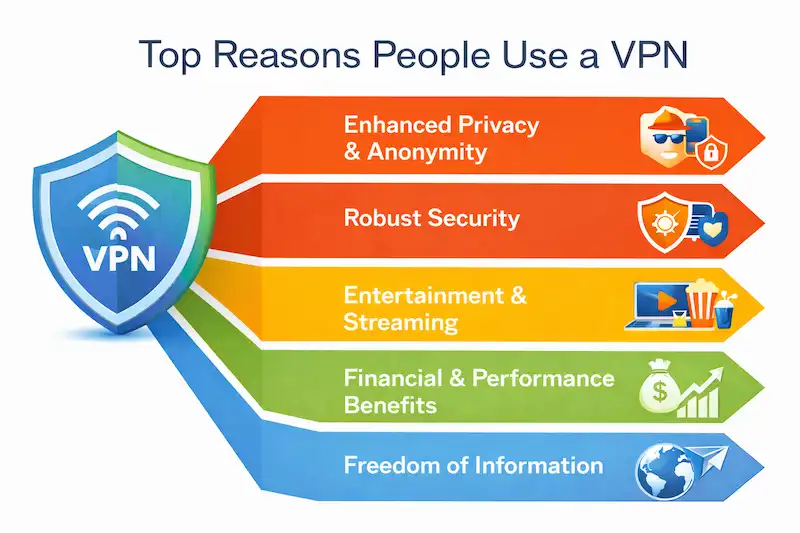
- Enhanced Privacy & Anonymity: To stop ISPs, advertisers, and websites from tracking your online identity or surfing patterns, a VPN encrypts your traffic and hides your true IP address.
- Robust Security: Particularly while utilizing unprotected public Wi-Fi, it generates a safe, encrypted "tunnel" that shields your private information from hackers, including bank account information and passwords.
- Entertainment & Streaming: With a VPN, you can get around geo-restrictions and access foreign content libraries on websites like YouTube, Netflix, and Hulu by pretending to be somewhere else.
- Financial & Performance Benefits: In addition to preventing ISPs from purposefully delaying (throttling) your connection during periods of high usage, it can assist you in finding cheaper airfare and hotel rates by making it appear as though you are in a different region.
- Freedom of Information: Users in limited areas can freely access social media, news sources, and educational materials by avoiding government firewalls and restrictions through the use of a virtual private network (VPN).
Is Using a VPN Legal?
Although using a VPN to safeguard your privacy is completely lawful in the majority of democratic nations, it does not provide legal immunity for illegal activities like hacking or copyright infringement.
Some totalitarian governments, like China and Russia, only allow government-approved services that might track your activities, while a few others, like North Korea, Belarus, and Iraq, completely forbid them.
How a VPN Works?
In the following ways, VPN works:
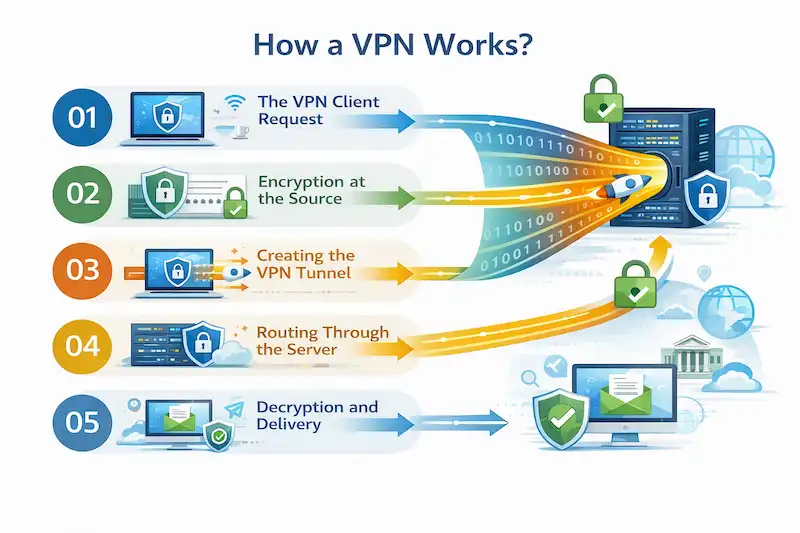
● The VPN Client Request: The client software on your device connects to a VPN server in a location of your choosing when you turn on your VPN.
● Encryption at the Source: Using a mathematical formula, the VPN software jumbles your data before it ever leaves your device. This transforms your private data into "ciphertext," which is unintelligible to everyone who does not possess the special decryption key.
● Creating the VPN Tunnel: Placement of the encrypted data inside a "digital envelope." Your data is protected from the rest of the public internet by a secure tunnel created by this process, known as encapsulation.
● Routing Through the Server: This tunnel carries your data to the VPN server. Your data seems to originate from the server's IP address and location, rather than your own, to the outside world.
● Decryption and Delivery: The data is decrypted and transmitted to its destination (such as a website) after arriving at the VPN server. Your identity is kept secret since the website interprets the request as originating from the VPN server.
VPN Protocols Explained
|
S.No. |
Protocols |
What? |
|
1. |
WireGuard |
The most recent industry standard, it offers the fastest speeds and most dependable performance for mobile devices by utilizing cutting-edge cryptography and significantly lighter code than previous protocols. |
|
2. |
OpenVPN |
The industry's "battle-tested" veteran, it is very safe, open-source (meaning that its code is continuously checked for errors), and incredibly adaptable because it can slip through most firewalls by posing as legitimate web traffic. |
|
3. |
IKEv2 (Internet Key Exchange version 2) |
It is popular among smartphones because of its "auto-reconnect" feature, which is renowned for its remarkable ability to keep a steady connection when your device transitions from Wi-Fi to cellular data. |
VPN Types (Personal VPN vs Business VPN vs Site-to-Site VPN)
The following are some of the types of VPN:
a) Personal VPN (Consumer VPN): Designed for individual users, it encrypts your web traffic, hides your IP address, and gets over geo-blocks for privacy or streaming by connecting your device to a public VPN server.
b) Business VPN (Remote Access VPN): In order to provide safe access to internal company files and resources, it creates a secure tunnel between a worker's distant device and a private corporate network.
c) Site-to-Site VPN (Router-to-Router VPN): Large corporations utilize it to create a seamless private network by permanently connecting two or more full office networks (such as a branch office to headquarters) using specialist hardware.
What VPN Does NOT Do?
|
S.No. |
Factors |
Why? |
|
1. |
Does Not Provide Total Anonymity |
Browser fingerprinting, monitoring cookies, and staying hooked into your Google or Facebook accounts while surfing are still ways that websites can identify you. |
|
2. |
Does Not Protect Against Malware or Viruses |
Although a VPN encrypts the "pipe" that your data passes over, it does not examine the files that you download; antivirus software is still required to prevent harmful payloads. |
|
3. |
Does Not Prevent Phishing Attacks |
A VPN cannot prevent your password from being manually entered into a fraudulent website after clicking a link in a phony email. |
|
4. |
Does Not Speed Up Your Internet |
A VPN will typically result in a slight decrease in connection speed rather than an improvement because your data must pass via an additional server and be encrypted. |
|
5. |
Does Not Make You Untraceable to the VPN Provider |
The VPN provider itself can see your traffic when you are hidden from your ISP. For this reason, picking a "No-Logs" service is essential. |
How to Choose a Safe VPN?
By considering the following factors, you can choose a safe VPN:
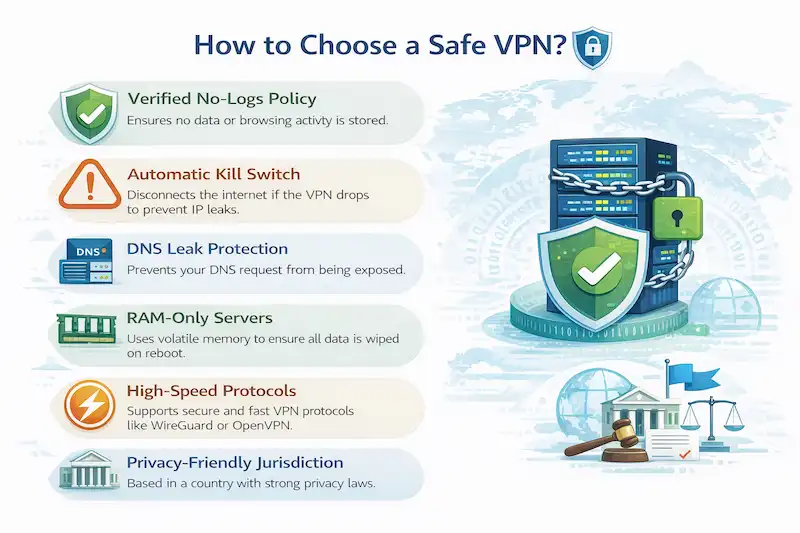
- Verified No-Logs Policy: Verify that the provider has completed independent third-party audits (by companies such as Deloitte or PwC) to demonstrate that they never save your IP addresses, browsing history, or connection timestamps.
- Automatic Kill Switch: In the case that the VPN fails, this crucial safety feature instantly disconnects your internet connection, keeping your private information from inadvertently escaping onto the open internet.
- DNS Leak Protection: This feature makes sure that your Internet Service Provider (ISP) cannot see any website requests because they remain inside the encrypted VPN tunnel.
- RAM-Only Servers: Because these customized servers only use volatile memory, all data is physically and immediately erased once the server reboots or loses power.
- High-Speed Protocols: To get the ideal combination of military-grade encryption and lightning-fast connections for 4K streaming and gaming, look for contemporary protocols like WireGuard or NordLynx.
- Privacy-Friendly Jurisdiction: Select a supplier situated outside of significant surveillance alliances and in a nation without statutory data retention regulations (such as Switzerland, Panama, or the British Virgin Islands).
How to Set Up a VPN on Any Device ?
|
S.No. |
Topics |
Factors |
What? |
|
1. |
The Easy Way: Using an App (Recommended) |
Choose a Provider |
Enroll in a trustworthy service (such as Proton VPN, ExpressVPN, or NordVPN). |
|
Download & Install |
Download the app from the App Store or Google Play Store (for mobile devices) or the provider's website (for PCs and Macs). |
||
|
Log In |
Input your login information and allow any permissions that are needed (iOS and Android will ask to "Add VPN Configurations"). |
||
|
Connect |
Either select a nation from the list or press the "Quick Connect" button. |
||
|
2. |
The Manual Way: Built-in Device Settings |
For Windows (10/ 11) |
● Go to Settings > Network & internet > VPN > Add VPN. ● Choose Windows (included) as the supplier. ● Enter your VPN service's server address and protocol (IKEv2, L2TP, etc.). ● After entering your login credentials, click Save and then Connect. |
|
For Mac (macOS) |
● Open System Settings > VPN. ● Click Add VPN Configuration, then select your protocol (IKEv2, for example). ● Put in the remote ID and server address. ● After entering your authentication information, turn the connection on. |
||
|
For iPhone (iOS) |
● Go to Settings > General > VPN & Device Management > VPN. ● Select "Add VPN Configuration." ● After entering the server information and choosing the Type (IKEv2, IPsec, or L2TP), click Done. |
||
|
For Android |
● Go to Settings > Connections (or Network & Internet) > More connection settings > VPN. ● To add a VPN profile, tap the three dots or the plus (+) symbol. ● After entering the account information, name, and server address, select Save and Connect. |
Common VPN Problems and Fixes
The following are some of the common VPN Problems and Fixes:
● Slow Connection Speeds: Change your protocol to a quicker one, like WireGuard, or move to a server that is closer to your actual location.
● VPN Being Blocked (by Netflix, Work, or School): To get around IP blacklists, connect to an "Obfuscated" server or move to another server in the same area.
● Frequent Connection Drops: Make sure the app isn't being killed in the background by your device's battery-saving mode and activate the "Auto-Reconnect" feature in your settings.
● Privacy Leaks (IP or DNS Leaks): To make sure all requests remain inside the tunnel, turn on IPv6 Leak Protection in your VPN settings and clear the DNS cache on your device.
● VPN Not Connecting at All: Make sure you are using the most recent version of the app and temporarily turn off your device's firewall or antivirus to check if they are preventing the software from running.
Frequently Asked Questions
About Virtual Private Network (VPN)
- What is a virtual private network VPN?
By passing your data through a private server, a Virtual Private Network (VPN) conceals your location and identity while establishing a safe, encrypted connection over the internet.
- What is FortiClient VPN used for?
Employees can safely access company resources from off-site by using a customized endpoint agent called FortiClient VPN to establish secure, encrypted SSL or IPsec connections between distant devices and a corporate FortiGate firewall.
- What is a virtual VPN used for?
By creating a secure, encrypted connection over the internet, a virtual VPN enables you to get around regional content limitations, conceal your IP address for privacy, and shield important data from hackers.
- What is a VPN and its types?
A VPN is a service that uses IP masking and encryption to secure your internet connection. There are three main types of VPNs: site-to-site (which connects complete office networks), business (which allows you to work remotely), and personal (which protects your privacy).
- Is VPN illegal in India?
Although VPNs are permitted for both personal and professional usage in India, service providers who have a physical location there are legally obligated to keep user logs for a period of five years.
- How does a VPN work step by step?
In the following ways, VPN works:
a) The VPN Client Request,
b) Encryption at the Source,
c) Creating the VPN Tunnel,
d) Routing Through the Server, and
e) Decryption & Delivery.
- How to use a VPN for beginners?
To use a VPN as a novice, just download a trustworthy VPN app, sign in, and press the "Quick Connect" button to conceal your location and automatically encrypt your internet connection.
- Does VPN work without the internet?
Because a VPN needs an existing network (either Ethernet, Wi-Fi, or cellular data) to create a secure "tunnel" to the VPN server, it cannot operate without an internet connection.
- What is the disadvantage of a VPN?
The primary drawbacks of utilizing a VPN are the obvious decrease in internet speed brought on by encryption costs and the possibility of privacy issues if you choose a subpar or unreliable company that tracks your data.
- Which VPN is not safe to use?
VPNs with a track record of disclosing logs (like PureVPN or HideMyAss), programs that have been found to insert malware or trackers (like Betternet or Hotspot Shield), and free services (like Hola VPN, which sells user bandwidth) are typically risky to use.
- Can you be tracked if you use a VPN?
Since a VPN merely conceals your IP address and traffic content and offers no defense against other popular digital monitoring techniques, the answer is yes, you can still be traced while using one.
- Can a VPN damage WiFi?
No, a VPN is entirely software-based and cannot physically harm your router or Wi-Fi hardware, though the burden of encrypting your data may cause the connection to feel slower.
Conclusion
Now that we have talked about Virtual Private Network (VPN), you might want to learn about it professionally from reliable sources. For that, you can get in contact with Craw Security, offering the Basic Networking Course with AI in Delhi to IT Aspirants.
During the training sessions, students will be able to use VPN and see how it works in the presence of a professional networking expert. Moreover, online sessions will facilitate students in remote learning.
After the completion of the Networking Training in Delhi offered by Craw Security, students will receive a dedicated certificate validating their honed knowledge & skills during the sessions. What are you waiting for? Contact, Now!
Want to build a career in cyber security?
Talk to our counsellors about courses, batches and fees. Free demo class available.


