

In this article
We all know we should not click on strange or shady mail, yet we do! Phishing scams operate in a straightforward manner by tricking you into clicking on a link or downloading an attachment that installs malware on your computer or may even direct you to another website that appears legitimate but takes all of your personal data.
What Does an Email Phishing Scam Mean?
Email phishing schemes are one of the most popular sorts of security concerns these days. Hackers frequently target organizations or individuals by sending them emails that may look quite convincing and from genuine sources like banks, government offices, clients, or even the management of the same organizations. In essence, the email's sender tricked the recipient into clicking on harmful links and even forced them to verify crucial and private information. People fall into traps of those emails, considering them to be legitimate because of the name of the sender or the attractive content, and subsequently lose crucial information.
What is an Email Phishing Scam?
Email phishing scams typically consist of dishonest goals by malevolent threat actors to get extremely sensitive and private information, including login credentials, financial details, or personal information, by pretending to be a trustworthy organization via electronic correspondence. The aforementioned fraudulent emails typically entice recipients to click on harmful URLs, open attachments that contain malware, or reveal private information under false pretenses.
What is a Phishing Email Attack?
In our world full of surprises, a random email with the goal of a social engineering approach to gain personal information for a person, a group of persons, or a whole business can be exhibited anytime in your email inbox. Generally speaking, a phishing email assault is a kind of social engineering technique used by cybercriminals to craft convincing emails that pose as legitimate organizations, such as banks, governments, or prestigious enterprises.
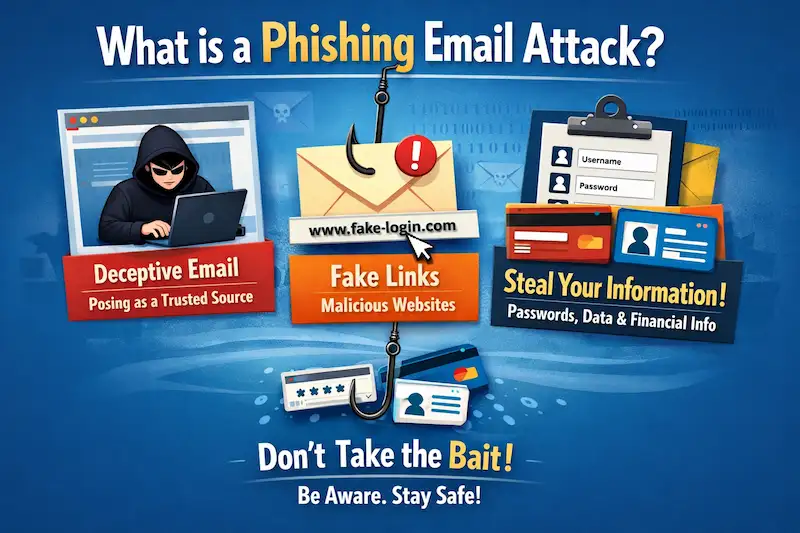
Additionally, these emails frequently employ aspects like urgency, fear, temptation, greed, or curiosity to persuade readers to do things that they would not normally do by luring them with alluring bonuses and offers to compromise their security posture.
Top 20 Ways to Protect Organizations from Email Phishing Scams
Due to the lockdown, work from home has grown, and so, chances of becoming entangled in these email phishing schemes have also increased. Cybercriminals are targeting every day by sending roughly 18 million ransomware or phishing emails. Spamming has also increased in the email realm. Almost 240 million spam emails are being distributed on a daily basis containing varied information on latest trends and viral news.
Hackers generally feed upon the fear or present appealing cash advantages to consumers to persuade them to click on the emails. Working from home has its advantages and cons, and cybersecurity has become one of the main Cons. It is crucial that individuals are informed of the strategies to combat email phishing scams, some of which are as follows:
- Educating and training the staff of the firm concerning cybersecurity with realistic phishing assaults, giving them practical exposure.
- As per the Government of India’s latest update, all the banks' websites will only end with “.bank.in” URL. Hence, you can identify fake and real bank websites so easily.
- Installing a tool that can confirm emails, like the Phishing Response tool, to validate the emails from known/unknown senders that look suspicious.
- Any email asking for personal information should be addressed with caution. Never respond to such emails right away or without first getting confirmation.
- It is usually best to confirm the sender’s email ID before continuing further with the email.
- Emails containing lengthy links or no content in the body should always be avoided.
- Often, phishing emails contain grammatical errors or inappropriate spelling; one should be mindful of this and keep it in mind at all times.
- Get unsolicited emails confirmed by the IT department of the organization before replying.
- Keep all email authentication methods in places like DMARC, DKIM, and SPF to avoid domain forgery.
- Beware of Unexpected email attachments or questionable mail links.
- Encrypting your emails can help protect all sensitive data.
- Take a thorough check at the URLs connected in the email body that can take you to another website with questionable Landing pages.
- Emails sent at strange hours with meaningless subject lines having questionable domain names should never be replied to.
- Always be sure the URL in the email starts with "HTTP," as it might not be secure to open otherwise.
- One must always safeguard their accounts with a multi-layer authentication procedure for logging in.
- Be careful of unwelcome emails with pop-ups or login forms asking for your account login information.
- Always keep a backup of your data to be on the safe side!
- Emails that promise cash rewards are typically fake and should not be trusted at all.
- Check for the Secure Socket Layer (SSL) certificate if there is any URL to be visited on
- You may prevent any risk by keeping your software and systems up to date with the newest security patches.
- Finally, always be mindful and vigilant!

Types of Phishing Attacks
Phishing attacks emerge in several forms, each geared to target particular vulnerabilities:
|
Email Phishing |
This is the major sort of phishing, in which attackers send false emails masquerading as real entities. These emails often contain malicious attachments or hyperlinks that, if clicked or downloaded, could corrupt the recipient's device or obtain their personal data illegally. |
|
Spear Phishing |
Spear phishing is a type of phishing in which hostile actors purposefully alter emails to target specific people or organizations. Attackers can strengthen their capacity to mislead recipients by collecting information about their targets from social media, websites, or other sources, enabling them to create highly tailored emails. |
|
Clone Phishing |
Making a duplicate of an authentic email that has already been received by the intended recipient is known as clone phishing. The copied email poses as coming from a trustworthy source and contains malicious hyperlinks or attachments, making it more likely that the recipient will fall for the scam. |
|
Whaling |
Whaling is a sort of phishing assault that especially targets on individuals of significant significance, such as chief executive officers (CEOs) or senior executives. In order to trick recipients into disclosing private information or sending money, perpetrators often pose as business leaders or other trustworthy people. |
|
Vishing |
Vishing, sometimes known as voice phishing, covers the usage of telephone conversations by malicious actors to deceive individuals into exposing personal data or engaging in certain behaviors. To increase the legitimacy of their calls, adversaries can use fake caller IDs or pretend to be legitimate organizations. |
|
Smishing |
Smishing is similar to phishing, but it is done using text messages (SMS). In order to trick recipients into disclosing private information or downloading dangerous content, adversaries send phony text messages that contain hyperlinks or phone numbers. |
|
Search Engine Phishing |
This sort of assault involves the development of counterfeit websites that are displayed in search engine results for regularly searched topics. When individuals surf fraudulent websites and input their personal information, bad actors have the opportunity to illicitly gain their login credentials or implant malicious malware onto their devices. |
|
Business Email Compromise (BEC) |
BEC assaults target businesses by posing as executives, employees, or business partners in an effort to trick staff members into sending money or disclosing private information. |
|
Ransomware Attacks |
Ransomware attacks sometimes involve the use of phishing emails with malicious attachments or links, even if they are not always categorized as phishing. When the virus is activated, it encrypts the victim's data and then demands a ransom to unlock it. |
|
Malware-Based Phishing |
Certain phishing attempts depend on malware to illicitly gather information from the electronic devices of their victims. Potential security concerns comprise keyloggers, which capture and store keystrokes, as well as banking trojans, which illicitly gain banking credentials. |
Phishing in Cybersecurity
Phishing is the most crafty adversary in cybersecurity that can convincingly extract extremely private and sensitive information that a person would not divulge to the public. To elaborate, phishing is a general word that describes the activity of sending false emails to a large number of people in an attempt to fool people who are not paying attention into downloading hazardous software or divulging critical information.
During working hours, these phishing emails appear at random alongside your regular business emails. They use your fear, urgency, temptation, greed, or curiosity to create an element of surprise.
How to Prevent Phishing?
To prevent email phishing tactics, a true combination of alertness, awareness, and robust security measures is needed. Here are several leading ways for guarding against spoofing attacks:
|
Educate and Train |
Organizations must prioritize cybersecurity awareness training so that people can identify fraudulent emails and learn about the dangers of phishing scams. |
|
Verify Sender Identities |
Check the email address and domain of the sender at all times to ensure its legitimacy. Phishers often use minor changes or misspellings in domain names as a pretext to trick victims. |
|
Exercise Caution with Links and Attachments |
It is best to refrain from opening attachments or clicking on links in emails that seem strange or dubious. Hover your cursor over links to see the URL and confirm its legitimacy before clicking. |
|
Implement Email Filters and Security Software |
Email filtering solutions and antivirus software can be used to automatically detect and quarantine harmful attachments and phishing emails. |
|
Enable Multi-Factor Authentication (MFA) |
For an additional layer of protection, whenever possible, deploy MFA, which demands additional verification beyond passwords in order to access accounts. |
Thishing Attack Website
In general terms, Phishing attack websites are fake sites that impersonate real websites to fool visitors into gaining the utmost sensitive information, such as banking details, social media passwords, etc. Many intricate and sophisticated strategies are routinely utilized by such sorts of Phishing Attack websites to duplicate the visual and tactile features of genuine web pages, hence rendering them tough to discern from authentic sites.
FAQs
About Top Ways To Protect From Email Phishing Scams
Q. 1: What is phishing email attack?
Phishing email assaults are a sort of cyber attack in which malicious actors transmit false electronic messages posing as authentic institutions. These email scams' main goal is to trick recipients into choosing dangerous links or attachments or disclosing private information, such as credit card numbers, passwords, or personal information.
Q. 2: What is phished email?
An email has been the target of a phishing attack when it is phished. An email that appears to be from a reliable source but is actually intended to deceive the receiver into disclosing private information or doing a harmful action has been sent by a malicious actor.
Q. 3: What are examples of phishing emails?
Phishing emails include those that claim to be from a bank or financial institution and ask for account information, those that pose as legal businesses and ask for login credentials, and those that claim to be from a government agency and ask for personal information.
Q. 4: What is phishing scam malware email?
Phishing scam malware emails are made of malicious software (malware) that attacks the recipient's machine or network with the purpose of stealing sensitive data. Frequently, a link or attachment in this style of email invites the recipient to install malware on their device.
Q. 5: What is a famous example of phishing?
One well-known example of phishing is the attack on the Democratic National Committee (DNC) during the 2016 U.S. presidential election. The hackers used phishing emails to trick DNC employees into disclosing their email credentials, giving them access to private information.
Q. 6: How is phishing done?
Phishing is typically carried out via email, in which the attackers send false communications that appear to be genuine correspondence. Malicious attachments and references to fraudulent websites are widespread in these communications. By opening the attachments or clicking on the links, recipients are misled into giving sensitive information or downloading harmful malware.
Q. 7: What are the 4 types of phishing?
Phishing comes in four primary forms:
- Email phishing,
- Spear phishing,
- Clone phishing,
- Whaling, etc.
Q. 8: Which phishing tool is best?
There is no "best" phishing tool because using phishing tools for fraudulent purposes is illegal and undesirable. Phishing tools are designed to help cybersecurity experts assess and improve system security by simulating phishing assaults under controlled conditions.
Q. 9: Why is it called phishing?
The term "phishing" comes from a humorous play on the word "fishing." Phishing involves malicious actors "fishing" for confidential data from persons who are unaware of the risks involved, similar to how a fisherman "fishes" for fish in a body of water.
Q. 10: Who uses phishing?
Cybercriminals and hackers who aim to illicitly get sensitive data, such as passwords, credit card numbers, or secret information, adopt phishing techniques. Phishing attacks may be undertaken by organized organizations or individuals.
Q. 11: Where is phishing used?
Any digital setting, including social media, email, and text messages, is susceptible to phishing. Targeting businesses, organizations, and individuals with the purpose of stealing sensitive data or distributing malware is a widespread occurrence.
Wrapping Up
In a nutshell, we would like to state that email phishing techniques actually pose a serious risk to both individuals and companies that unintentionally encounter them. Nevertheless, these risks can be efficiently avoided by the implementation of preventive measures and suitable cybersecurity training.
The kind of outstanding cybersecurity training toward such email phishing attacks as well as other types of cyber attacks, can be delivered by Craw Security, which is the best cybersecurity training institute in India, supplying people with the necessary knowledge and capabilities to safeguard digital assets and counter ever-evolving cyber threats. You can ask about anything more linked to the next batches of the Best Cybersecurity Training Programs by Craw Security by calling our hotline number +91-9513805401 and having a conversation with our highly excellent team of study consultants.
Furthermore, we can all cooperate to protect ourselves from the pervasive threat posed by email phishing scams by remaining vigilant, being extremely cautious, and putting robust security measures in place.
Want to build a career in cyber security?
Talk to our counsellors about courses, batches and fees. Free demo class available.


